Draft
These two pages decide the last two lines on a customer's invoice. They are independent of each other but share one principle: unconfigured means zero. With no shipping zones, every order ships free; with no tax rates, no order is taxed. There is no warning and nothing is blocked — orders still go through, you are simply absorbing the cost.
Which is why these are two pages to do before you open, not after the first order.
Shipping: zones first, then rates
The structure has two levels and cannot be inverted: a zone is a group of countries, and a rate lives inside a zone. Where the customer is decides which zone applies, and then the customer picks one of that zone's rates.
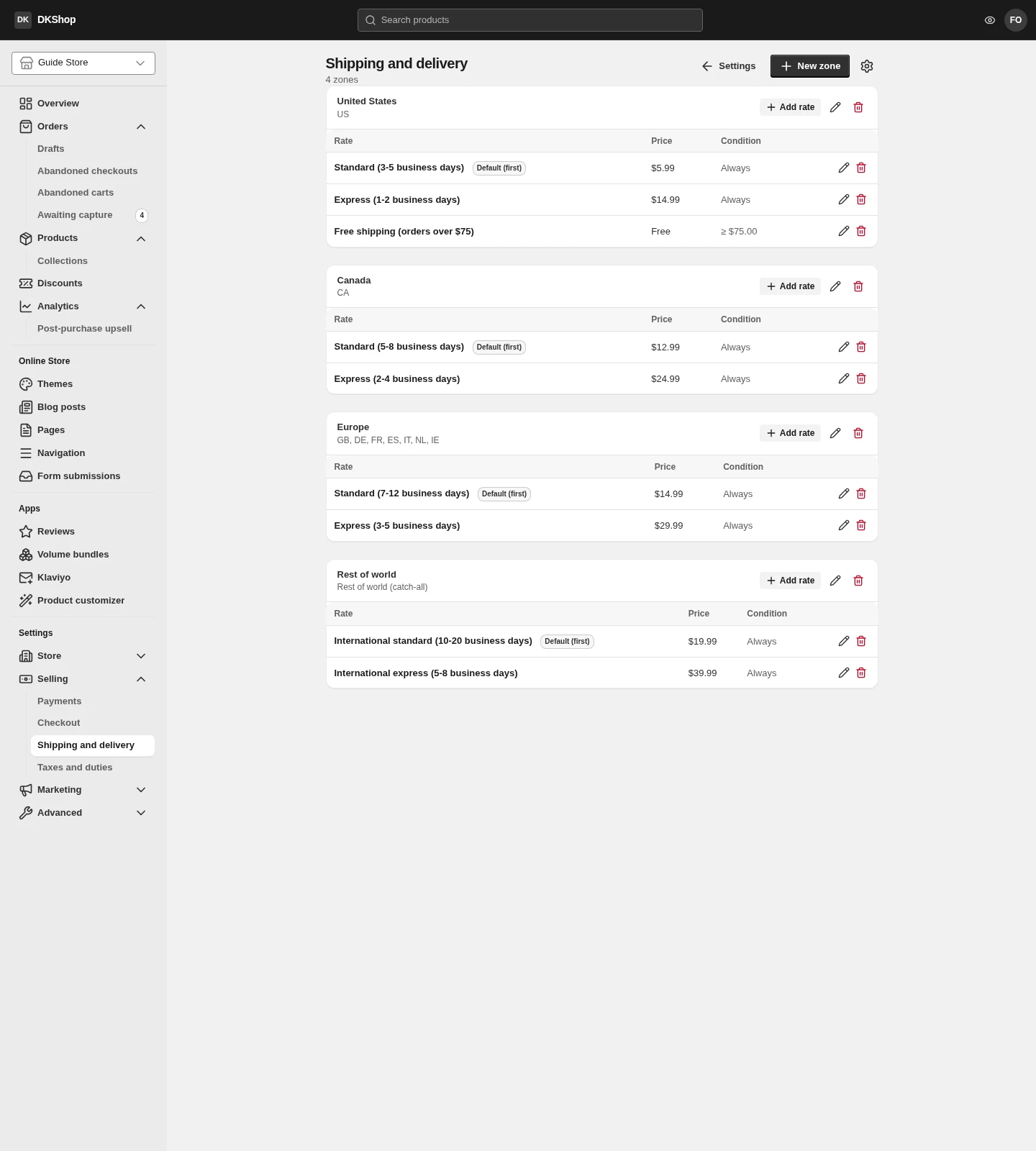
The usual arrangement is one zone for your main market, one or two for the countries you sell most to, and one zone that catches everything else.
Always create a catch-all zone. Create a zone and leave its country list empty and it takes every destination that matches no other zone — the screen shows it as Rest of world (catch-all). Without one, a customer in a country you forgot to list has no delivery option at all and cannot check out. The table says as much on an empty zone: "No rates — buyers in this zone can't check out."
If a zone carries a never matches warning badge, a country code in it is invalid so it can never match anyone. Open Edit and pick from the list again.
Adding a rate
Press Add rate on the zone you mean (each zone has its own button).
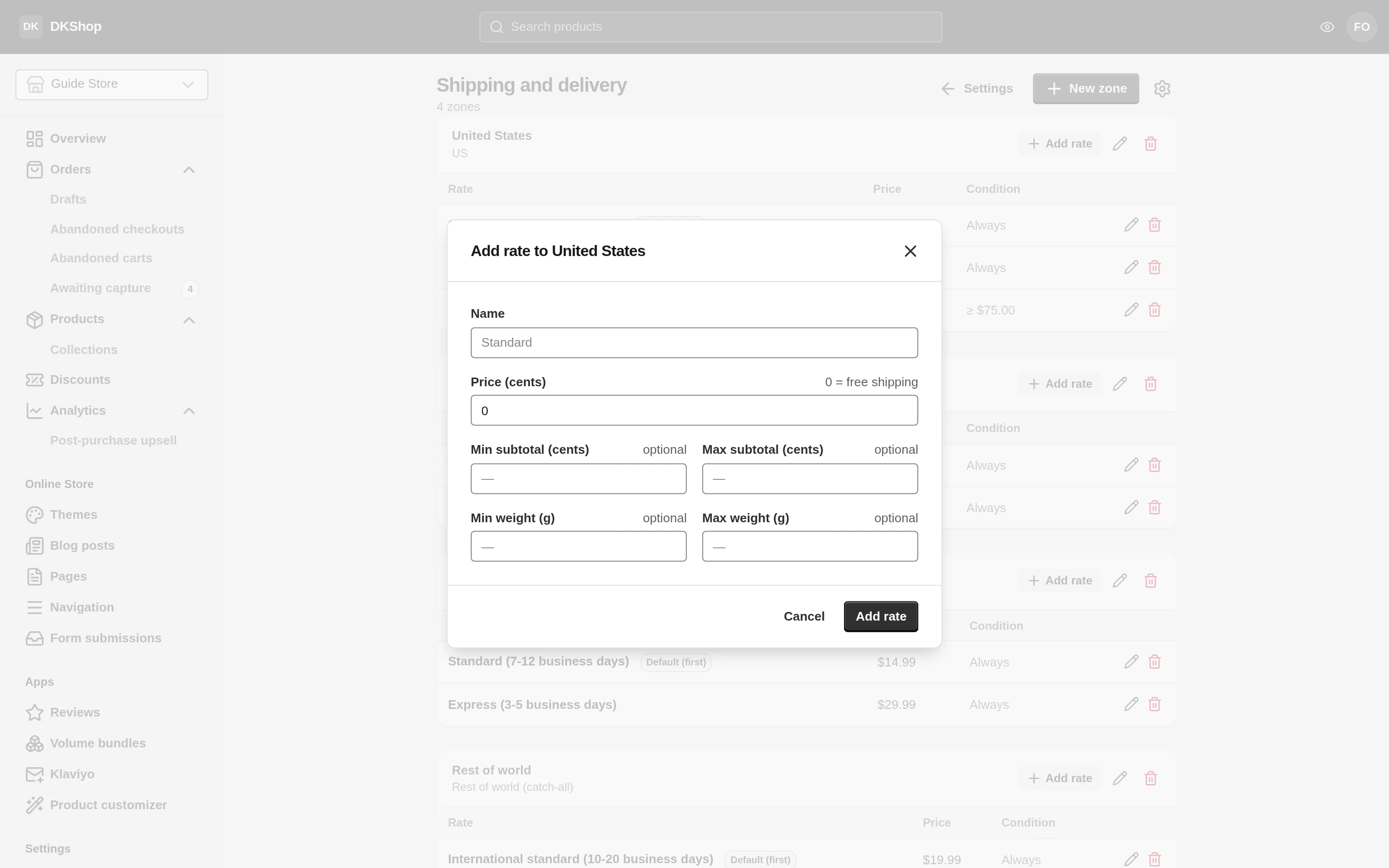
The money fields here are in cents, not dollars
Price (cents), Min subtotal (cents), Max subtotal (cents) — all three are cents. $5.99 has to be typed as
599.This differs from the product editor, where you type
39.95exactly as the price reads. Type5.99here and the system rejects it while the modal only says "Could not add the rate." — without saying why. If you meet that line, it is almost certainly a decimal point in a money field.
Name — what the customer sees when choosing a delivery method. Include the expected time, because that is what they are actually weighing up: Standard (3-5 business days) says more than Standard.
Price (cents) — 0 means free delivery, and the table shows Free rather
than $0.00.
The other four fields are conditions, all optional:
| Field | Meaning |
|---|---|
| Min subtotal | Only offered when the basket is at least this much |
| Max subtotal | Only offered when the basket is at or below this much |
| Min weight / Max weight | The same, but on total weight (grams) |
Leave them all empty and the rate is always offered — the Condition column
reads Always.
This is how you build free shipping over $75: a rate named Free shipping (orders
over $75), price 0, Min subtotal 7500. The Condition column then reads
≥ $75.00, and the rate only appears on a qualifying basket.
Weight comes from each variant's Weight field. A variant with no weight counts as 0, so if you intend to charge by weight, fill weights in first — otherwise every basket falls into the lightest band.
Which rate is preselected
The checkout preselects a delivery rate as soon as the customer finishes the address, so they do not have to press an extra step and so the total is complete.
The badge in the table tells you which one is preselected:
- Default (first) — you have not chosen, so the system takes the first rate in the list.
- Default — you chose this one.
To change it: Edit on the zone → Default shipping method. That field only appears once the zone has rates, because before that there is nothing to point at.
If the default you chose does not qualify for a particular basket (say you set Free over $75 as the default but the basket is $30), the checkout falls back to the first rate. Customers never see a rate that cannot apply.
Tax
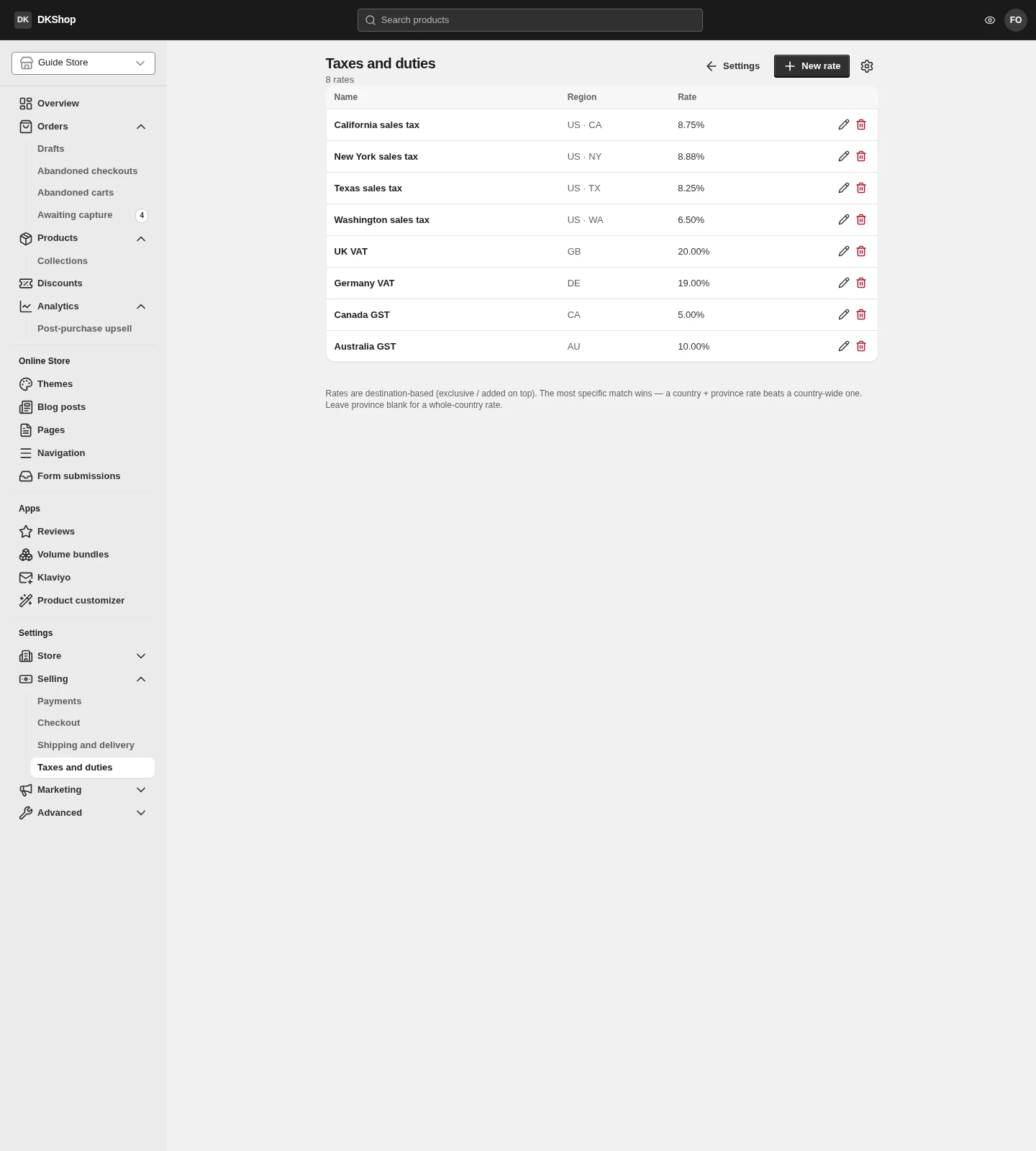
Tax here is destination-based and added on top (exclusive): calculated from the shipping address, and added to the product price rather than included in it. The price you enter for a product is the price before tax.
Rate (%) is entered as an ordinary percentage — 8.25 is 8.25%. (Yes, this
differs from the shipping page above. Here you type what you would expect.)
A more specific rate beats a general one. With both US at 6% and US · CA at 8.25%, a customer in California pays 8.25% and a customer in another state pays 6%. Exactly one rate applies — they never add up.
Leaving the province/state field empty makes the rate apply country-wide.
A never applies badge means the region code on that row is invalid, so it can never match anyone — open Edit and pick again.
Dikafy does not know where you owe tax. There are no built-in tax tables, no automatic updates when the law changes, and no automatic revenue thresholds. Every row here is one you entered and one you are responsible for. If you sell across several states or countries, ask an accountant first — this is where you record the conclusion, not where you find it.
A check before you open
Four things worth five minutes:
- Is there a catch-all zone, and does it have at least one rate?
- No zone is empty of rates — an empty zone blocks checkout.
- No row carries a never matches / never applies badge.
- Open the store, put a product in the basket, go to the checkout and type a real address for each of your main markets. The shipping column and the tax line should come out exactly as configured.
Step 4 is the only one that tests the whole chain at once, and it is also the fastest way to notice a zone you forgot.
Reference
The Shipping and delivery page
| Where | Control | Notes |
|---|---|---|
| Top | New zone | Creates a zone |
| Zone | Add rate | Each zone has its own button |
| Zone | Pencil | Edit the name, the country list, the default rate |
| Zone | Bin | Deletes the zone and every rate in it. Does not ask twice |
| Table | Rate | The name customers see |
| Table | Price | Free when it is 0 |
| Table | Condition | Always, or the thresholds you set |
| Table | Default badge | The rate preselected at the checkout |
| Zone form | Name | Only you see it |
| Zone form | Countries | Empty = catch-all |
| Zone form | Default shipping method | Only shown once the zone has rates |
| Rate form | Name | Include the expected delivery time |
| Rate form | Price (cents) | Cents. 0 = free |
| Rate form | Min / Max subtotal (cents) | Cents. Empty = no limit |
| Rate form | Min / Max weight (g) | Grams. Taken from the variant's Weight |
The Taxes and duties page
| Where | Control | Notes |
|---|---|---|
| Top | New rate | Creates a tax rate |
| Table | Region | The country, and the province/state if set |
| Table | never applies badge | The region code is invalid — fix it |
| Table | Pencil / Bin | Edit / delete. Delete does not ask twice |
| Form | Name | Only you see it |
| Form | Country | Required |
| Form | Province / State | Empty = country-wide |
| Form | Rate (%) | A percentage, not basis points. 8.25 = 8.25% |
Next: Orders — where an order appears once the customer has paid, and how you handle it.
Verified against 82dff35b1474 · 2026-08-29