Draft
Four screens under Orders answer the same question at four different stages: money that should have arrived and has not — where is it?
| Page | The stage | What you do |
|---|---|---|
| Abandoned carts | Shoppers who filled a basket and left | Remind them — if you know who they are |
| Abandoned checkouts | Shoppers who reached the checkout and did not finish | Remind them, and find out why |
| Awaiting capture | Money being held, not yet an order | Usually nothing |
| Drafts | Orders you wrote yourself | Send them or mark them paid |
This chapter covers the first three.
How a cart differs from a checkout
The settings page itself puts it most briefly: "Two surfaces, one step apart."
- Abandoned checkout — the shopper entered an email and then stopped before paying. You always have a way to reach them.
- Abandoned cart — the shopper never got that far. You can only reach them if they subscribed, signed in, or bought from you before.
Which means your number of abandoned baskets is always far larger than the number you can act on, and the only way to close that gap is not on this page — it is in collecting an email earlier (a popup, a signup form).
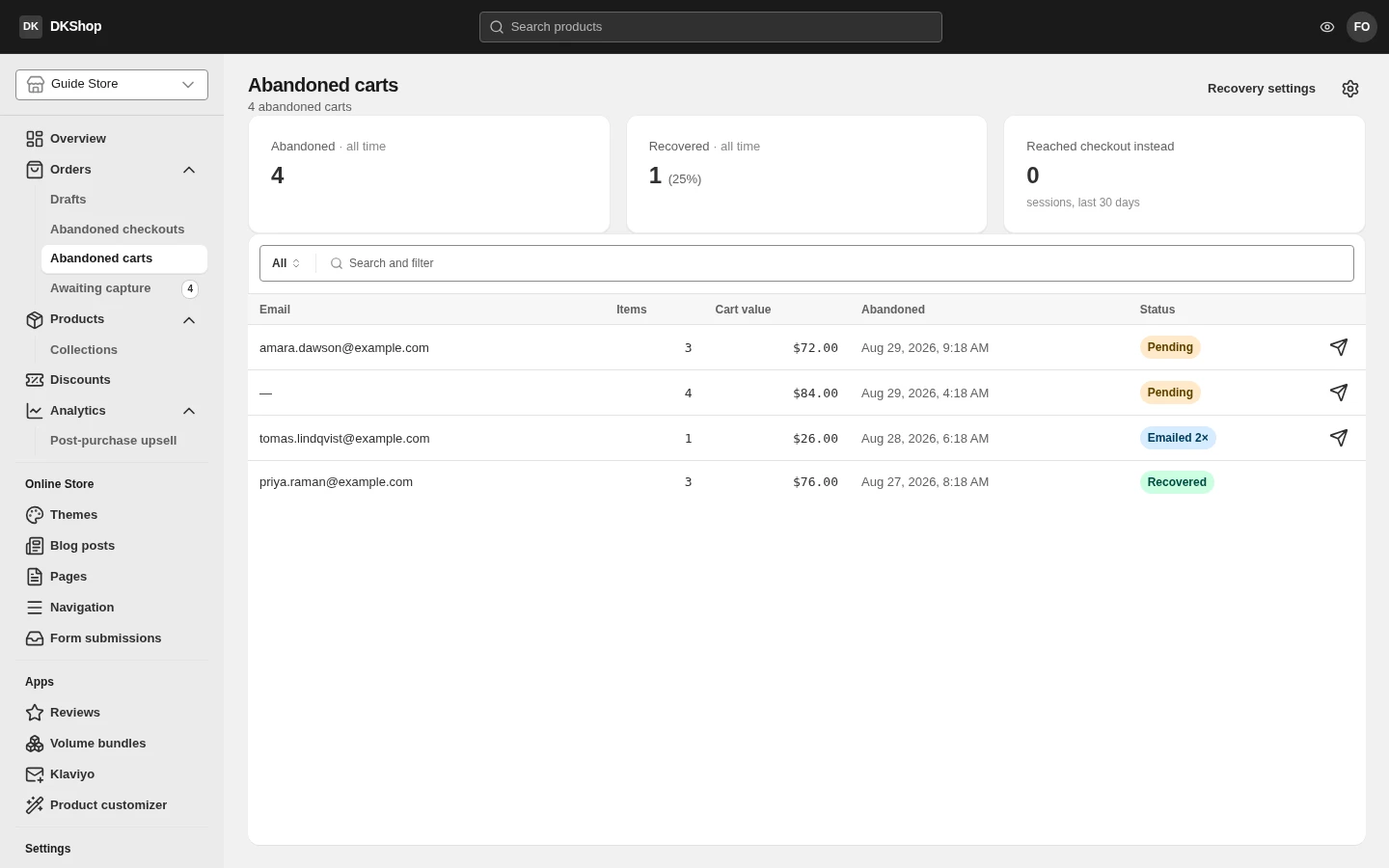
The Abandoned carts page shows exactly that: one row's Email column is empty, and that row has no send button — not because the feature is missing, but because there is no address to send to.
Abandoned checkouts
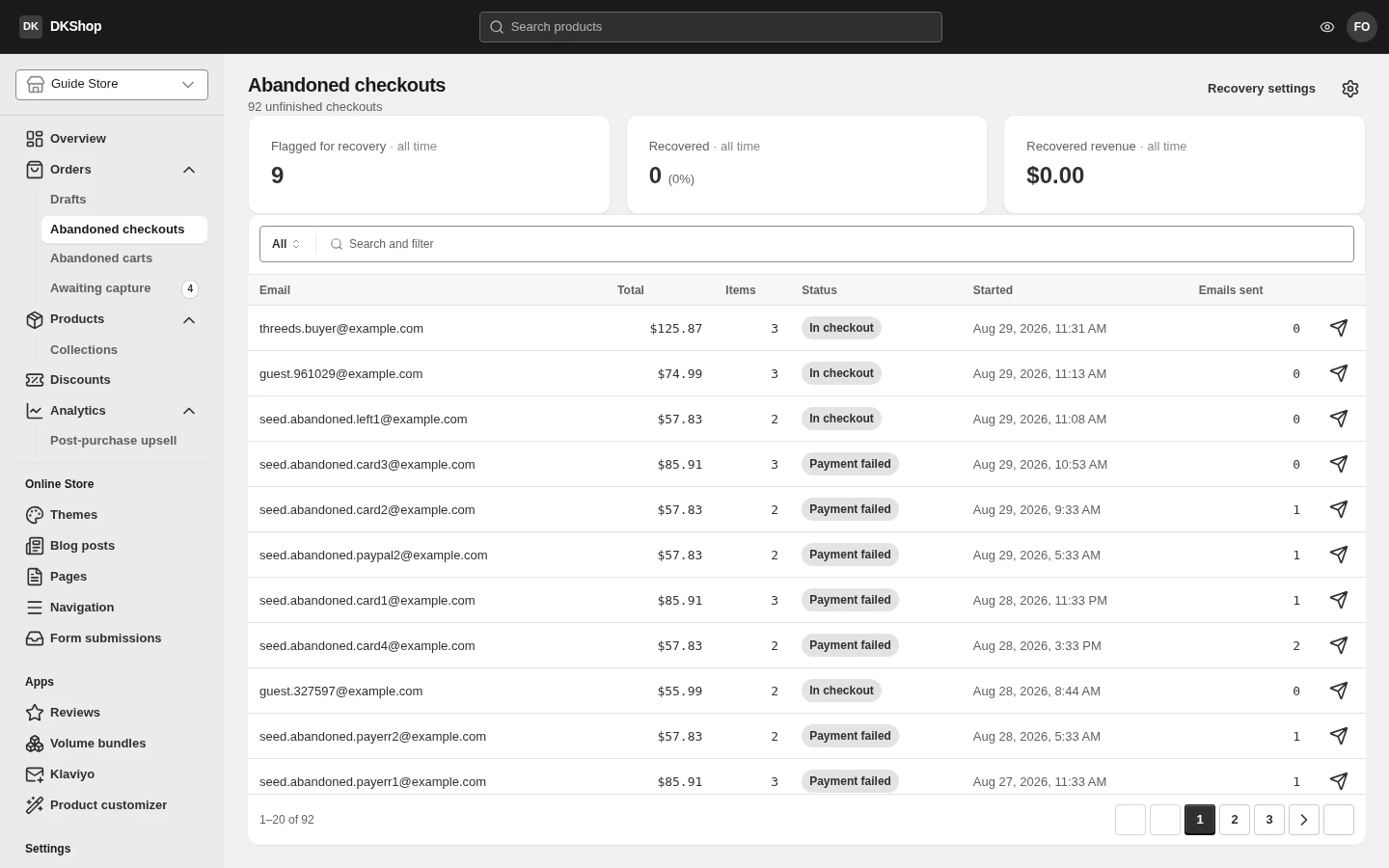
This list is every checkout that has not become an order, not only the ones the system flagged for email. The State column separates four very different situations:
| State | Meaning |
|---|---|
| Active | Still in the checkout, not idle long enough to count as abandoned |
| Abandoned | Idle long enough — this is the group that gets reminder email |
| Failed | A payment was declined. This is the group most worth reading |
| Recovered | They came back and bought |
Failed is not Abandoned, and they should not be treated alike. Someone who walked away changed their mind; someone whose card was declined wanted to buy and could not. The second group is usually a technical failure — an expired card, a mistyped CVV, a bank block — and the recovery rate is far higher.
One attempt in detail
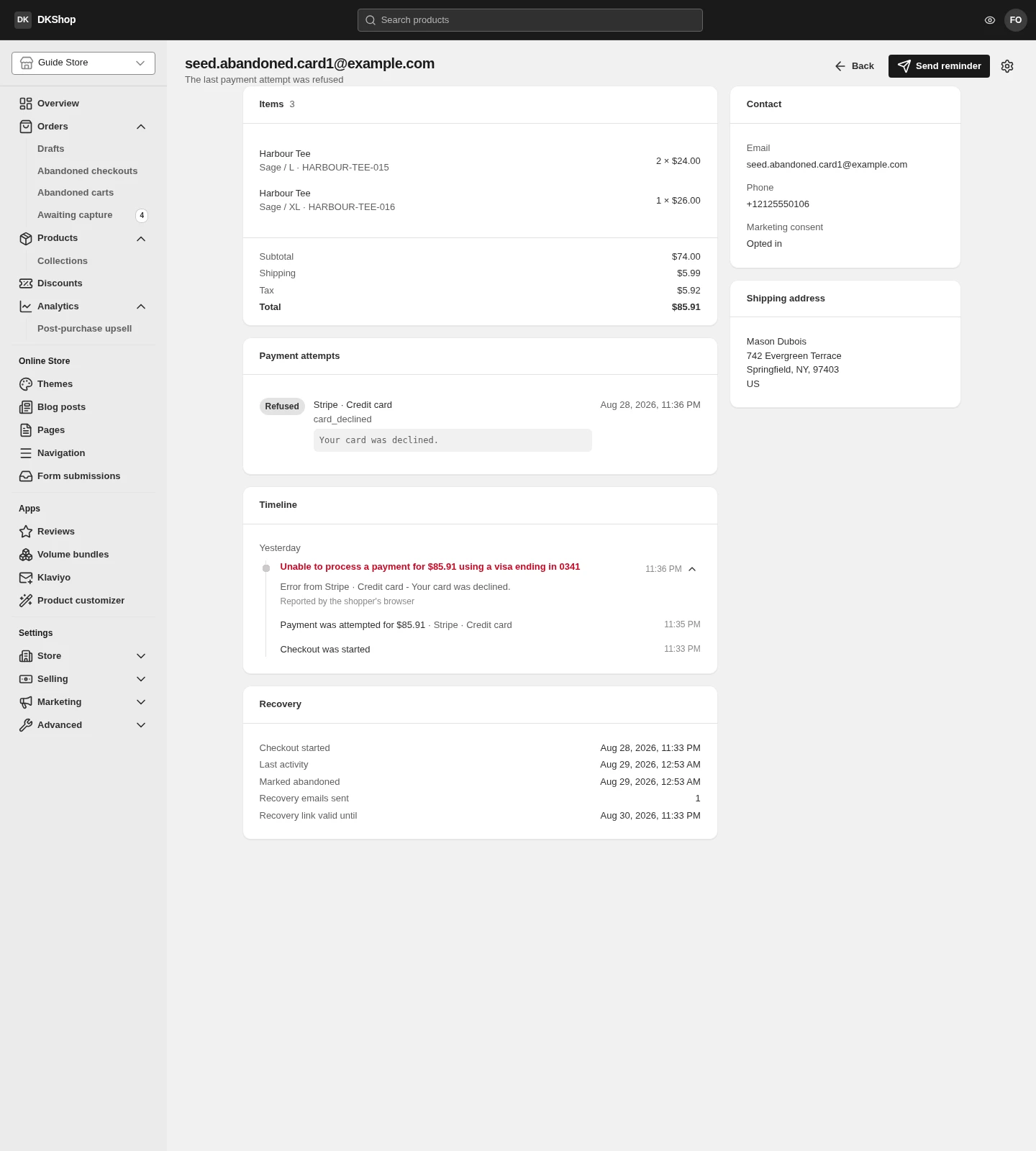
Press a row to open it. On the left are the basket, the payment attempts and the timeline; on the right the contact, marketing consent and shipping address.
Payment attempts shows each try: which gateway, which route, the reason code
(card_declined), and the gateway's refusal verbatim.
Timeline is the sequence: Checkout was started → Payment was attempted → Unable to process a payment…. The error line names its source — "Reported by the shopper's browser" means the customer's own browser reported it, rather than the server inferring it.
Send reminder at the top sends a reminder now, outside the automatic schedule. Use it when you have just read a Failed attempt and want to handle it personally.
The gateway's own words appear only here, for you. Customers never see them — the checkout says "Please check your card details and try again" from a fixed set of phrases. That is deliberate: a gateway's answer contains internal codes, order ids and correlation ids, which are not things to put on the page where somebody is typing a card number.
Awaiting capture
This page lists money that has been approved but not taken, meaning an order does not exist yet even though the customer pressed pay. Almost always because they are in the middle of the post-purchase upsell funnel.
An empty page here is normal and good. It only has rows while money is in flight right then, and for most stores that is a few minutes at a time.
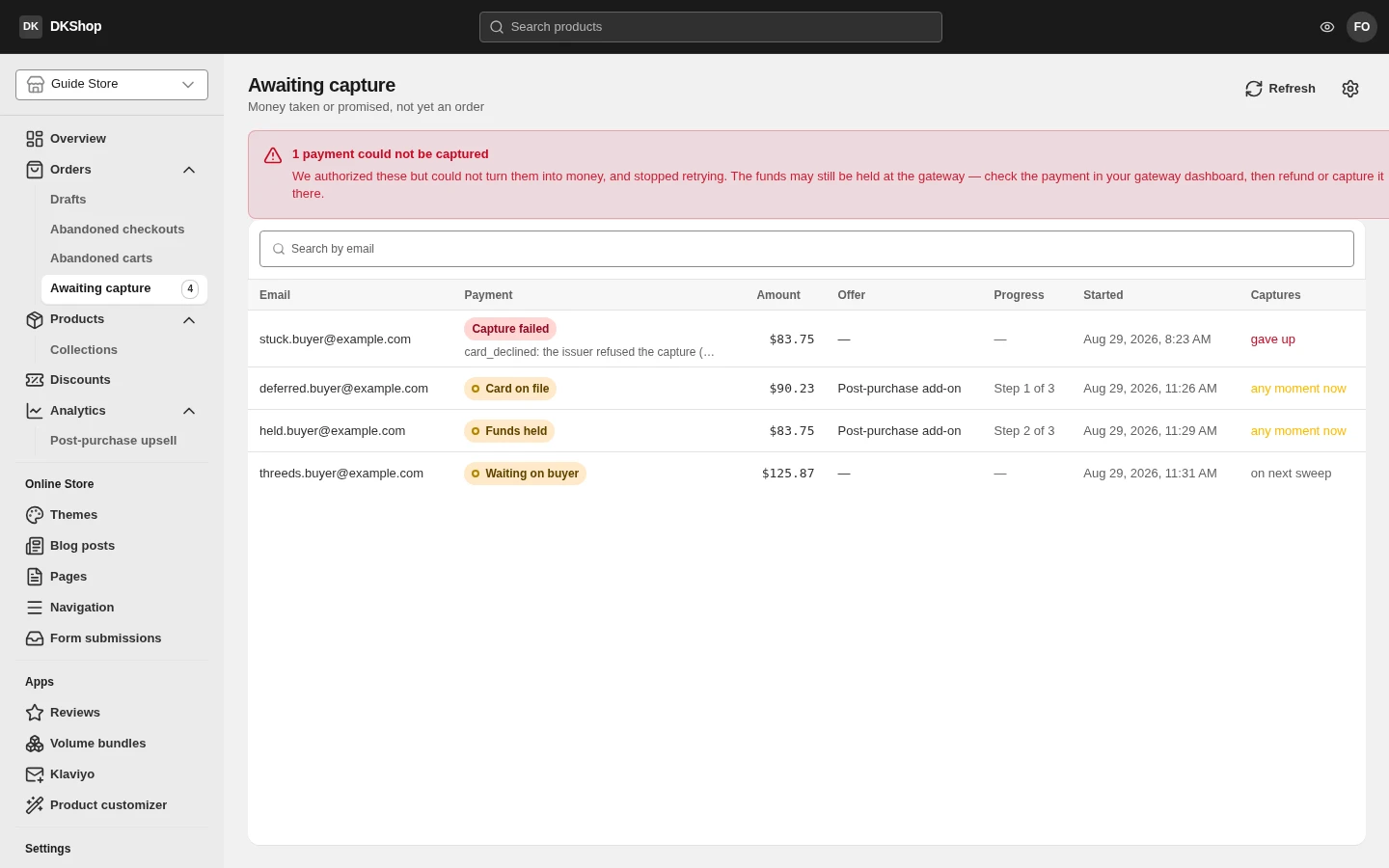
Four states, and only one needs you:
| State | Meaning | Anything to do? |
|---|---|---|
| Funds held | The money is held and will almost certainly be captured | No |
| Card on file, nothing held | A payment method exists, nothing is held. It can still be declined | No |
| Waiting on buyer | The customer is being asked for 3DS authentication | No — it is on them |
| Capture failed | Capture was tried, refused up to the limit, and given up on | Yes |
Capture failed sorts to the top of the table, because it is the only state that does not resolve itself. The customer's money is still held at the gateway — no gateway in this system performs a void — so there is no order and the money has not been released either. What to do: open the gateway's dashboard, cancel the hold, and contact the customer.
Configuring the reminders
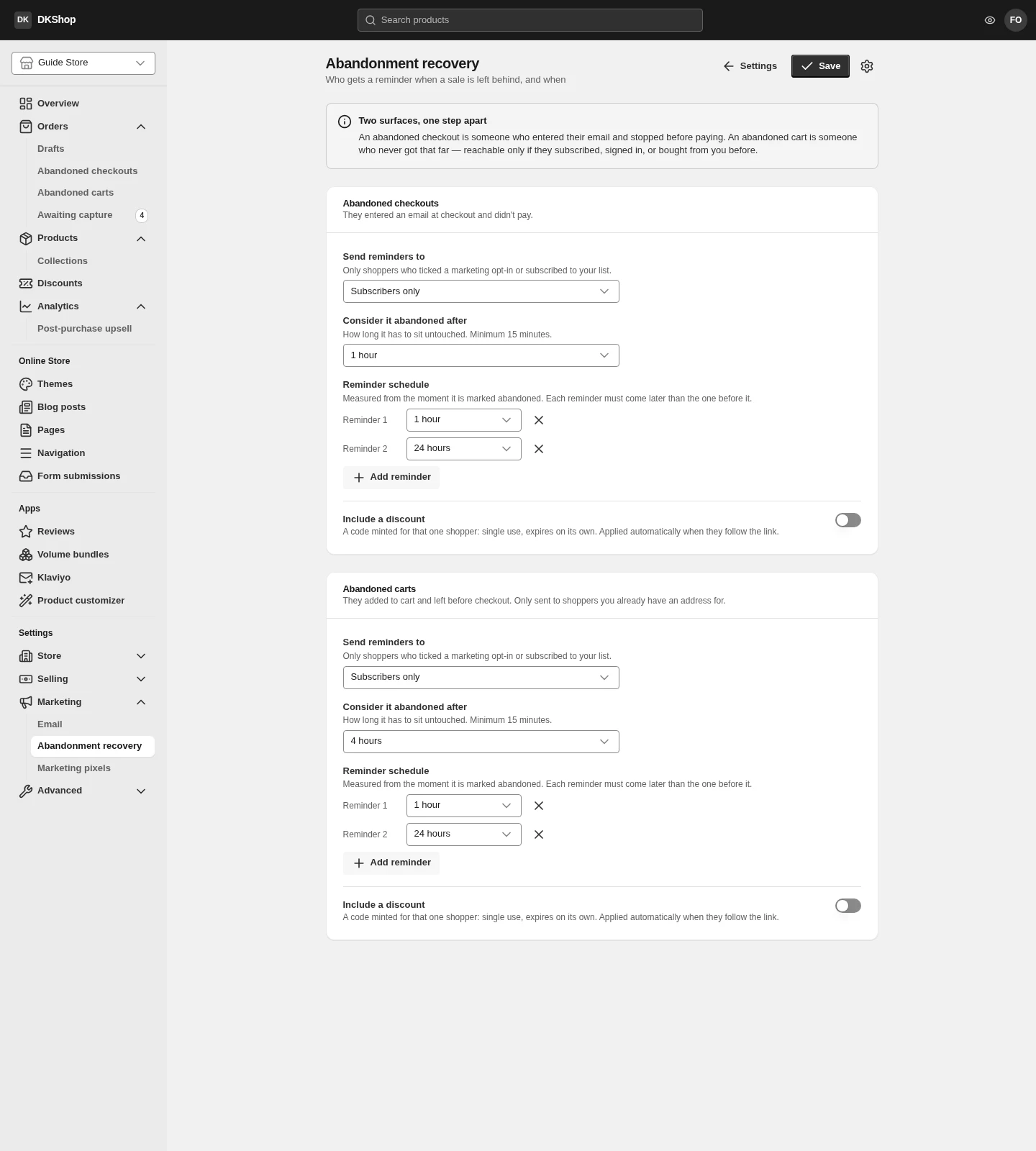
Settings → Abandonment recovery, and the two surfaces (cart / checkout) are configured completely independently.
Send reminders to — three choices, and this is a legal decision rather than a technical one:
| Choice | Meaning |
|---|---|
| Subscribers only | Only people who ticked the marketing box. The default |
| Anyone we can reach | Every address you hold, consented or not. Recovers the most — and the responsibility is yours |
| Nobody — off | Send nothing. Everything is still recorded for reporting |
Choose Anyone and the page warns "You're emailing shoppers who never opted in". In the EU/UK that may be unlawful; elsewhere it may not be. The page does not decide for you, it just says so.
Consider it abandoned after — how long idle counts as abandoned. Minimum 15 minutes.
Reminder schedule — up to four reminders, each a delay after the previous. Two is enough for most stores: one early while they still remember, one later.
An attached discount code — switch it on and each recipient gets a private,
single-use, expiring code. Start offering it at decides which reminder first
carries one — 2 means the first reminder is a plain nudge and the discount is only
for people who genuinely need another reason. Code expires after sets its life.
Do not attach a discount to the first reminder. Somebody who forgot their basket and comes back because you reminded them buys at full price — attaching a code immediately is paying for an order you already had.
Reference
| Where | Control | Notes |
|---|---|---|
| Abandoned checkouts | State column | Active · Abandoned · Failed · Recovered |
| Abandoned checkouts | Press a row | Opens the detail |
| Detail | Payment attempts | Gateway, route, reason code, the error verbatim |
| Detail | Timeline | The sequence of events, with the source of each |
| Detail | Recovery | When, how many emails sent, when the link expires |
| Detail | Send reminder | Sends now, outside the schedule |
| Awaiting capture | 4 states | Only Capture failed needs you |
| Awaiting capture | Empty | Is the normal state |
| Settings | Send reminders to | Subscribers only · Anyone · Off |
| Settings | Consider it abandoned after | Minimum 15 minutes |
| Settings | Reminder schedule | Up to 4 |
| Settings | Start offering it at | Which reminder first carries a code |
| Settings | Code expires after | The code's lifetime |
Next: Orders — where an order lands when everything goes right.
Verified against 82dff35b1474 · 2026-08-29