Draft
Klaviyo is an email and SMS marketing platform. Dikafy connects to your own Klaviyo account — we do not resell it, we do not hold your list, and you pay Klaviyo directly at their prices.
The connection works both ways: pushing data out (orders, behaviour, the product catalogue) and reading back the list of people who unsubscribed, so that you do not email somebody who opted out elsewhere.
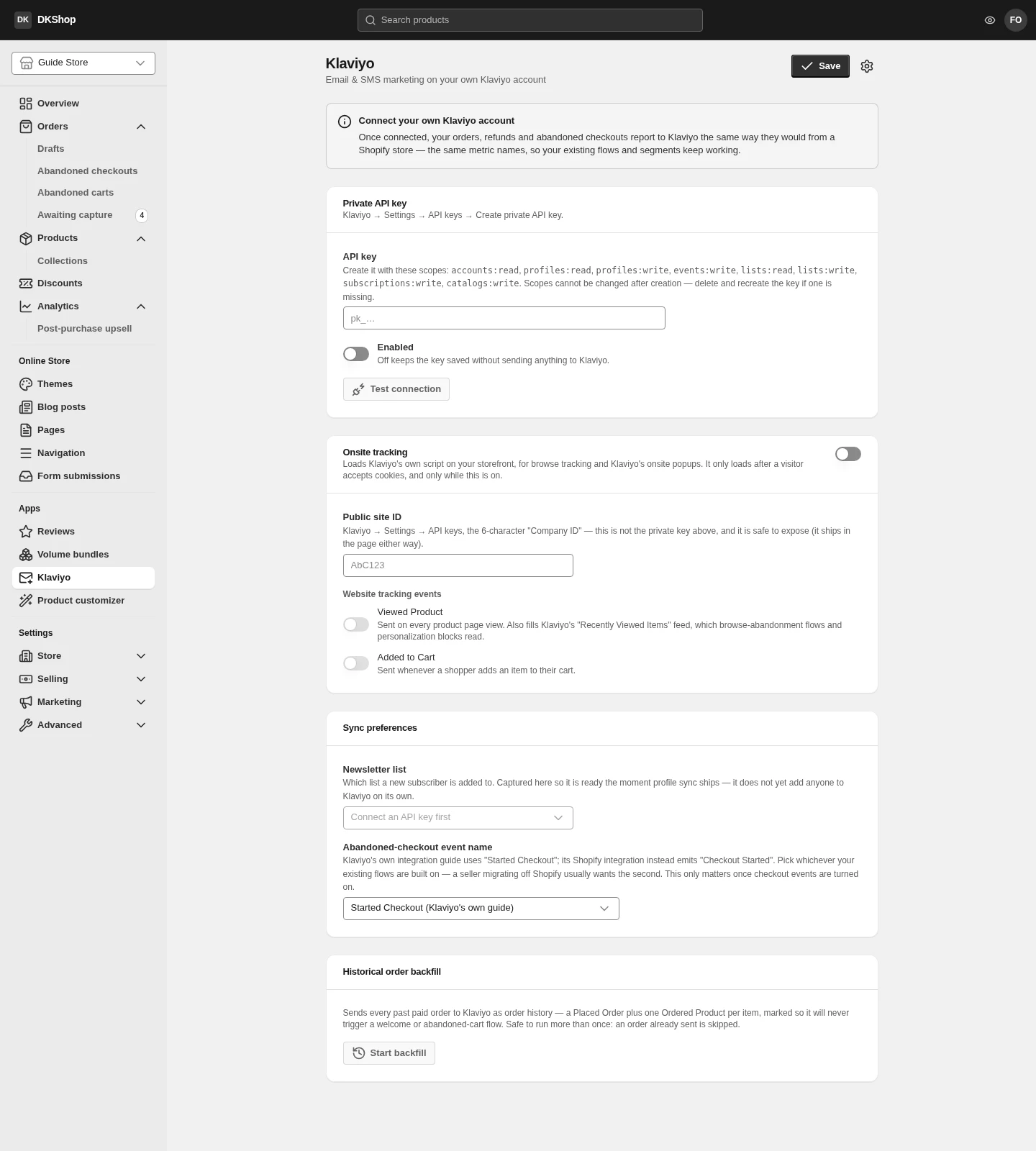
Connecting the account
You need a Private API key created in Klaviyo (Settings → API keys → Create Private API Key).
Choose every scope up front — they cannot be changed
The key needs eight scopes:
accounts:read·profiles:read·profiles:write·events:write·lists:read·lists:write·subscriptions:write·catalogs:writeKlaviyo does not allow a key's scopes to be edited after creation. Miss one and you have to delete the key and make another. This page lists all eight — copy the list as it stands.
Missing
accounts:readis the most common case, because it is not obvious: it is the scope used to check the key itself, so without it the very first connect attempt fails.
Test connection calls Klaviyo and shows your account name on success. Press it before saving — a wrong key is something you find out here.
The key is encrypted on save and never shown again: reopening the page shows
only a short hint (pk_…abc123). Leave it blank to keep the existing key.
A Klaviyo trial account shows a "This is a Klaviyo test account" warning. A test account cannot send real email — it connects and syncs, but flows never reach a recipient.
Onsite tracking
Onsite tracking embeds Klaviyo's snippet in the storefront and needs the Public site ID (different from the private key — this one is public and appears in the page source).
Once on, two events are switched separately:
| Event | When it is sent |
|---|---|
| Viewed Product | A customer opens a product page |
| Added to Cart | A customer adds to the basket |
These two are the raw material for Klaviyo's browse abandonment flow. Without them, that flow has nothing to trigger on.
Onsite tracking sits behind the cookie consent banner if your store has one enabled. A customer who has not consented sends no events — which is as it should be, but it means Klaviyo's numbers will be lower than your real order count.
What is synced automatically
Once connected, these events are sent from the server, independent of the customer's browser:
| Event | When |
|---|---|
| Started Checkout | A customer reaches the checkout and has given an email |
| Placed Order + Ordered Product | The order is paid |
| Fulfilled Order | You mark it shipped |
| Refunded Order / Cancelled Order | Refund / cancellation |
Because they are sent from the server, these events cannot be blocked by the browser and arrive even if the customer closes the tab straight after paying.
The product catalogue is also synced periodically, with stock levels — that is what Klaviyo's product recommendation blocks and its back in stock feature read.
Newsletter list chooses which list receives new subscribers from the store. A list with double opt-in enabled is labelled as such, because a subscriber is not added to it until they confirm by email.
Abandoned-checkout event name renames the event that is sent. Only change it if you are migrating from another platform and your Klaviyo flow already points at a different name.
Importing order history
Start backfill pushes your existing orders into Klaviyo, so that segmenting on purchase history works immediately rather than after months of accumulation.
Orders imported this way are marked as historical data, so they do not trigger flows — a customer who bought three months ago will not suddenly get a "thank you for your order" email.
It can be run repeatedly: each order is sent once, so pressing it again only pushes what is still missing.
Two things to decide first
Duplicate abandonment email. Dikafy has its own abandonment reminders, and so does Klaviyo. Enable both and the same customer gets two sequences from the same store. Pick one: if you already use Klaviyo, the usual answer is to turn Dikafy's off under Settings → Abandonment recovery.
Who owns sending. Once connected, Klaviyo is where you compose and send; Dikafy only supplies data. Order email (confirmation, shipping, refunds) is still sent by Dikafy — that is transactional email, not marketing, and it does not go through Klaviyo.
Reference
| Block | Control | Notes |
|---|---|---|
| Private API key | API key | 8 scopes, not editable after creation |
| Private API key | Test connection | Really calls Klaviyo and shows the account name |
| Onsite tracking | Switch | Embeds Klaviyo's snippet in the storefront |
| Onsite tracking | Public site ID | Not the private key. Public |
| Onsite tracking | Viewed Product | Raw material for the browse abandonment flow |
| Onsite tracking | Added to Cart | The same |
| Sync preferences | Newsletter list | The list new subscribers join |
| Sync preferences | Abandoned-checkout event name | Only change it when migrating |
| Backfill | Start backfill | Old orders, no flows triggered. Re-runnable |
Next: Product customizer — letting customers design the item themselves.
Verified against 82dff35b1474 · 2026-08-29