Draft
The theme decides what your store looks like. A new store already has one installed and published, so nothing in this chapter is compulsory — but this is where your store stops looking like every other store.
One live theme, many drafts
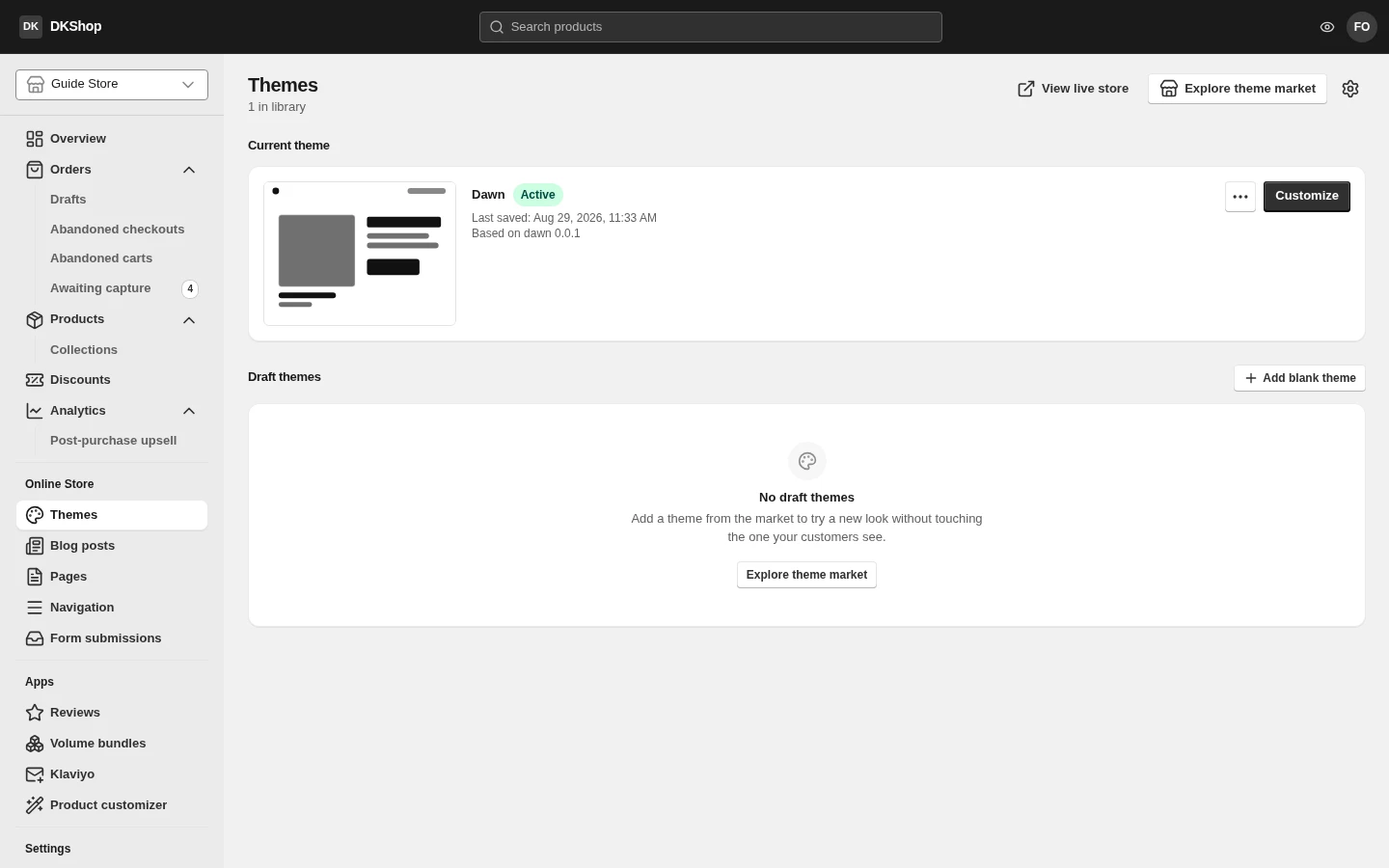
The Themes page is in two halves, and the line between them is the whole idea:
Current theme — the theme customers are looking at. Exactly one, badged Active, with its last-edited date and a "Based on …" line saying which template it came from and at which version.
Draft themes — everything else. Edit them freely, preview them freely; customers see nothing until you press Publish.
That is the safety net: editing a draft carries no risk at all. For a big change, duplicate the live theme, edit the copy, preview it, and only then publish.
The buttons at the top: View live store opens the real storefront; Explore theme market opens the theme market. In each theme's ⋯ menu:
| Item | What it does |
|---|---|
| Preview | Opens that theme through a preview link, without affecting customers |
| Rename | Renames it in the library |
| Duplicate | Copies it. This is the thing to do before any large change |
| Publish | Puts this draft live in place of the current theme |
| Delete | Deletes it. Disabled for the live theme — a store must always have one |
The theme market
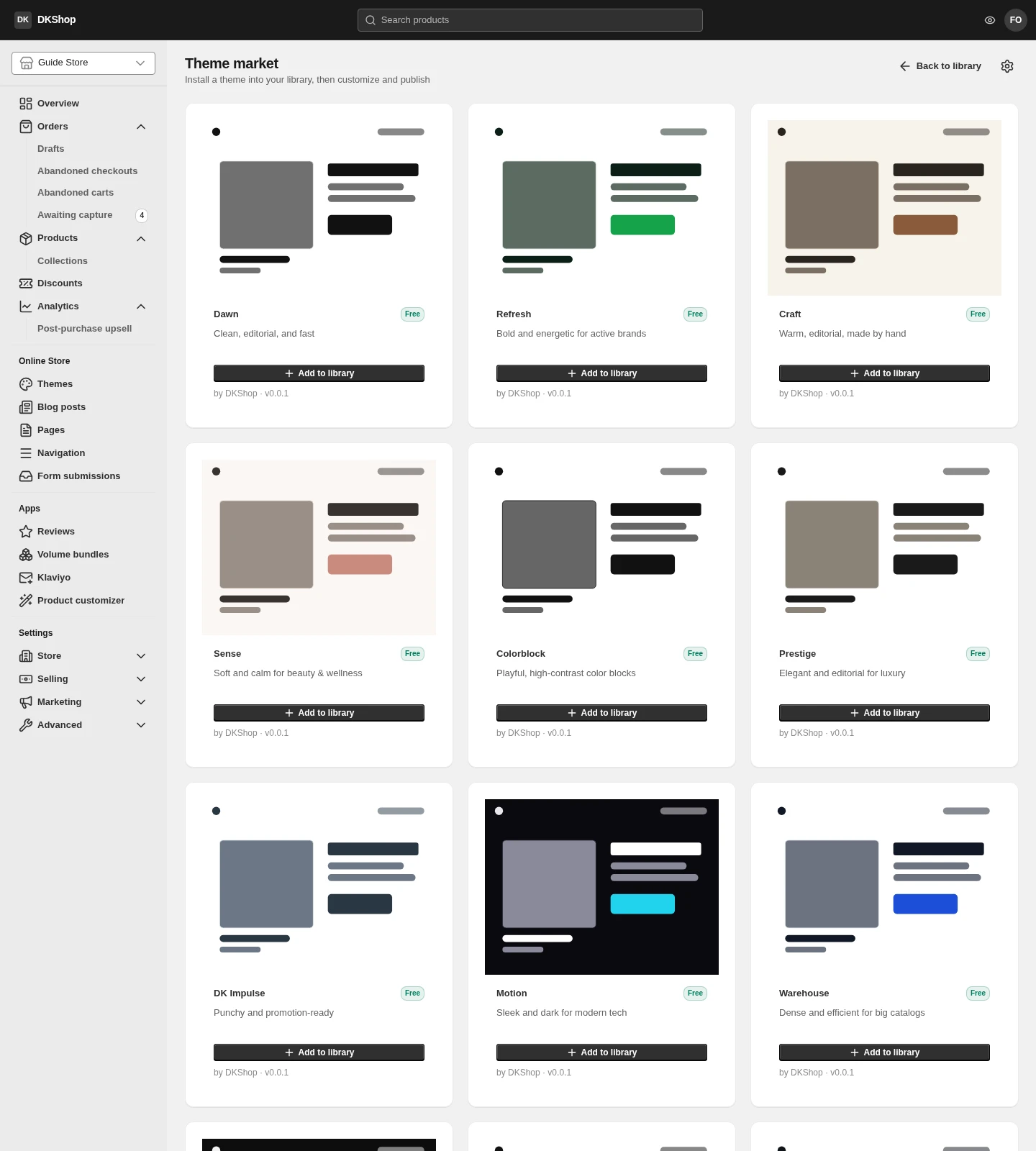
Explore theme market lists the installable templates. Installing one creates a new draft in your library — it does not touch the live theme, so trying a new template carries no risk.
An installed theme is a COPY. Once installed it is yours: updates to the original template do not edit your theme (and cannot undo your changes). When a new version exists the library tells you, and taking it means installing another draft alongside the old one — no operation ever overwrites your work.
The theme builder
Press Customize to open the builder.
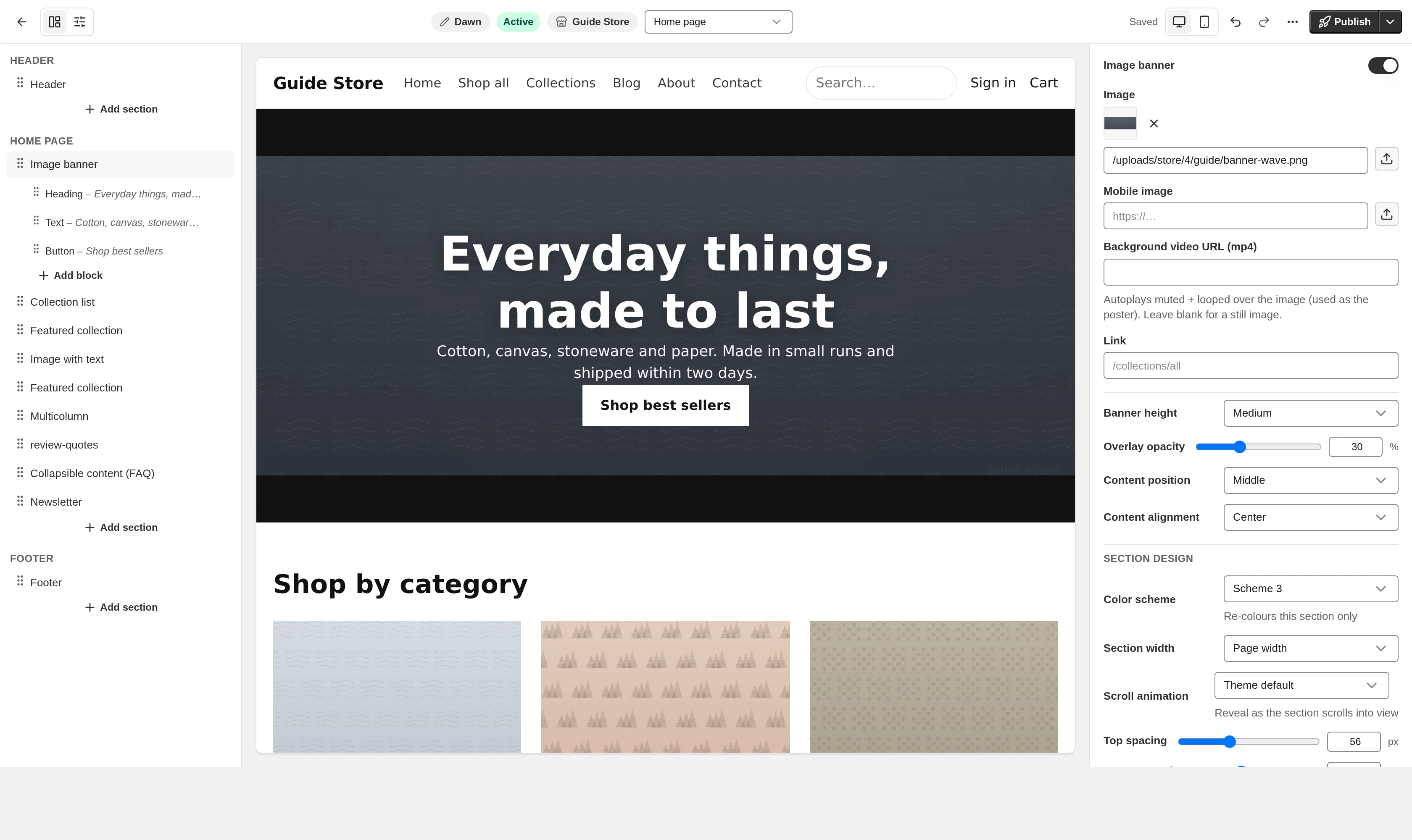
Three areas:
Left — the structure of the page. The list of sections in the order they appear. There are always three groups: Header, the current page, and Footer — the header and footer are separate because they appear on every page, not only the one you are editing. Drag to reorder. The page picker at the top switches between Home, Product, Collection, Cart…
Middle — your real store. Not a mock-up: that is your own storefront running in a frame. Hover any part of it and you get a dashed outline with its name; click to select that section in the left-hand list. The two ⊕ buttons above and below each section insert a new section exactly there. The desktop/mobile toggle changes the preview width.
Right — properties. The settings of whatever is selected. Select a section and you get the section's settings; select a block inside it and you get the block's.
At the top: the theme name (press it to rename), the Active/Draft status, Undo / Redo (Ctrl+Z, Ctrl+Shift+Z), and Publish. The menu beside Publish holds Save draft.
Drafts save themselves; publishing does not. Every change is written to the draft after about a second. The real store does not change until you press Publish. So you can stop halfway and come back tomorrow.
Ctrl+Z inside a text field undoes your typing, not the theme. While the cursor is in an input the shortcut belongs to that input — which is what you expect while typing. Click outside first, then Ctrl+Z undoes the theme change.
Sections and blocks
A section is a horizontal band of the page: a hero image, a product grid, a logo strip, an FAQ. A block is an element inside a section: a line of text, a button, a review.
Every section has a shared group of settings — colour scheme, width, top and bottom spacing, hide on desktop or mobile. On top of that, each type of section has its own.
The product and cart pages go further: they are assembled from blocks, so you can reorder the price, the buy buttons, the description and the reviews — and drop whatever you do not use.
The real store
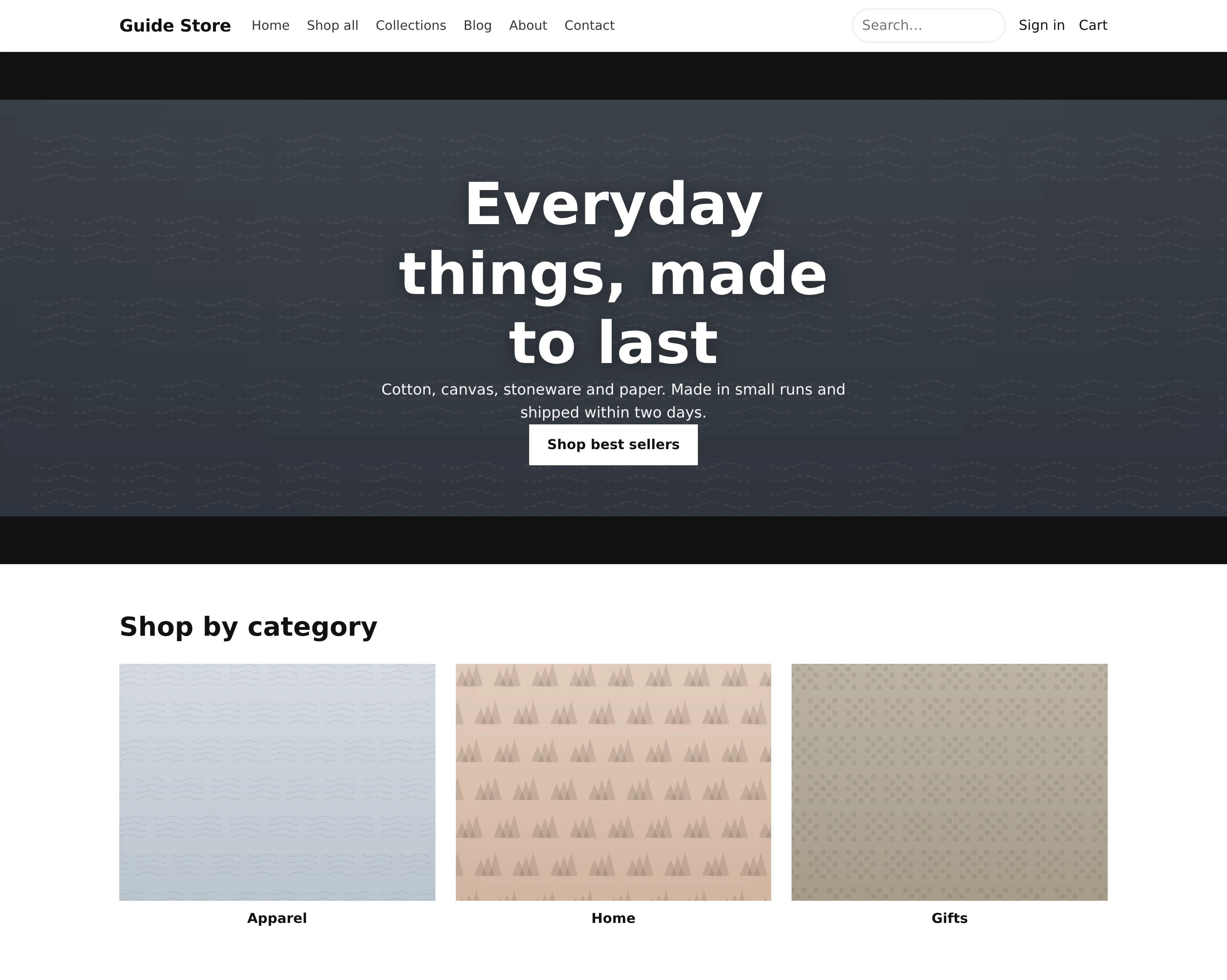
This is the result: a home page built from the default theme, showing the store's own products and collections.
Reference
| Where | Button | What it does |
|---|---|---|
| Themes | View live store | Opens the real storefront |
| Themes | Explore theme market | The theme market |
| Themes | Customize | Opens the builder for that theme |
| Themes | Add blank theme | An empty draft, based on no template |
| ⋯ | Preview | Preview without affecting customers |
| ⋯ | Rename · Duplicate | Rename · Copy |
| ⋯ | Publish | Puts the draft live in place of the current theme |
| ⋯ | Delete | Disabled for the live theme |
| Builder | Sections / Theme settings | The two modes of the left column |
| Builder | Undo / Redo | Ctrl+Z · Ctrl+Shift+Z. Does nothing while the cursor is in an input |
| Builder | Publish ▾ → Save draft | Saves immediately rather than waiting for autosave |
Reference — theme settings
Every setting in the Theme settings tab, by group. This table is generated from the source itself, so it can never drift from what you see on screen.
| Nhóm | Trường | Điều khiển | Ghi chú |
|---|---|---|---|
| Logo | Logo image | Ảnh | |
| Max width | Thanh trượt | 60–400px — mặc định 140 |
|
| Alt text | Ô chữ | ||
| Favicon | Favicon (32×32 recommended) | Ảnh | |
| Colors | Background | Màu | |
| Text | Màu | ||
| Primary / brand | Màu | ||
| Muted text | Màu | ||
| Borders | Màu | ||
| Headings | Màu | ||
| Button background | Màu | ||
| Button text | Màu | ||
| Header background | Màu | ||
| Header text | Màu | ||
| Footer background | Màu | ||
| Footer text | Màu | ||
| Sale price | Màu | ||
| Badge background | Màu | ||
| Badge text | Màu | ||
| Typography | Heading font | Phông chữ | |
| Body font | Phông chữ | ||
| Heading size | Thanh trượt | 24–72px — mặc định 40 |
|
| Body size | Thanh trượt | 12–20px — mặc định 16 |
|
| Heading letter-spacing | Thanh trượt | 0–8px — mặc định 0 |
|
| Uppercase headings | Bật/tắt | mặc định false |
|
| Uppercase buttons | Bật/tắt | mặc định false |
|
| Layout | Header layout | Danh sách chọn | Logo left, menu beside it · Logo centred, menu left · Logo left, menu centred · Logo centred, menu below · Logo left, menu in a drawer · Logo centred, menu in a drawer — mặc định logo-left |
| Transparent header over the home hero | Bật/tắt | mặc định false |
|
| Page width | Thanh trượt | 1000–1600px — mặc định 1200 |
|
| Section spacing | Thanh trượt | 0–100px — mặc định 48 |
|
| Style | Corner radius | Thanh trượt | 0–32px — mặc định 10 |
| Shadow | Danh sách chọn | None · Small · Medium · Large — mặc định none |
|
| Corner radius | Thanh trượt | 0–40px — mặc định 10 |
|
| Fill style | Danh sách chọn | Solid · Gradient · Outline — mặc định solid |
|
| Height (vertical padding) | Thanh trượt | 4–32px — mặc định 11 |
|
| Width (horizontal padding) | Thanh trượt | 8–48px — mặc định 20 |
|
| Border width | Thanh trượt | 0–6px — mặc định 0 |
|
| Border color | Màu | ||
| Shadow | Danh sách chọn | None · Small · Medium · Large — mặc định none |
|
| Button background/text color are set under Colors → Button background / Button text. | help_text | ||
| Product cards | Card style | Danh sách chọn | Plain · Boxed (border + padding) · Text over image · Editorial caption — mặc định plain |
| Image ratio | Danh sách chọn | Adapt to image · Square (1:1) · Portrait (3:4) · Landscape (4:3) — mặc định adapt |
|
| Text alignment | Danh sách chọn | Left · Center — mặc định left |
|
| Image hover | Danh sách chọn | None · Zoom · Show second image — mặc định zoom |
|
| Bestseller badge | Bật/tắt | mặc định false |
|
| Bestseller tag | Ô chữ | mặc định bestseller |
|
| Sale badge | Bật/tắt | mặc định false |
|
| Sale badge shows | Danh sách chọn | Percent off (-25%) · Amount off · Fixed text — mặc định percent |
|
| Sale badge text | Ô chữ | mặc định Sale |
|
| Quick add button | Bật/tắt | mặc định false |
|
| Product page | Product page layout | Danh sách chọn | Even split · Wide media · Media full width, info below — mặc định split |
| Sticky add-to-cart bar | Bật/tắt | mặc định true |
|
| Show "Only N left" | Bật/tắt | mặc định true |
|
| Trust badges | Ô chữ nhiều dòng | ||
| Sale urgency timer | Bật/tắt | mặc định false |
|
| Timer length | Thanh trượt | 1–120min — mặc định 15 |
|
| Timer label | Ô chữ | mặc định Sale ends in |
|
| Show star ratings | Bật/tắt | mặc định false |
|
| Popup | Show newsletter popup | Bật/tắt | mặc định false |
| Heading | Ô chữ | mặc định Get 10% off |
|
| Text | Trình soạn thảo | mặc định Join our list for early access + a welcome discount. |
|
| Image (optional) | Ảnh | ||
| Show after | Thanh trượt | 0–30s — mặc định 4 |
|
| Button text | Ô chữ | mặc định Sign up |
|
| Style | Danh sách chọn | Follow theme settings · Custom — mặc định theme |
|
| Background | Màu | ||
| Text color | Màu | ||
| Height | Thanh trượt | 0–96px — mặc định 0 |
|
| Corner radius | Thanh trượt | 0–40px — mặc định 10 |
|
| Border width | Thanh trượt | 0–6px — mặc định 0 |
|
| Border color | Màu | ||
| Shadow | Danh sách chọn | None · Small · Medium · Large — mặc định none |
|
| Animations | Scroll reveal | Danh sách chọn | None · Fade in · Fade up — mặc định none |
| Announcement bar | Show announcement bar | Bật/tắt | mặc định false |
| Messages | Ô chữ nhiều dòng | mặc định Free shipping on orders over $50 |
|
| Rotate every | Thanh trượt | 3–15s — mặc định 5 |
|
| Link (optional) | link | ||
| Let visitors close it | Bật/tắt | mặc định false |
|
| Experience | Page-load preloader | Bật/tắt | mặc định false |
| Scroll-progress bar | Bật/tắt | mặc định false |
|
| Infinite scroll on collections | Bật/tắt | mặc định false |
|
| Sticky bottom bar | Bật/tắt | mặc định false |
|
| Sticky bar text | Ô chữ | mặc định Summer sale — up to 50% off |
|
| Sticky bar button label | Ô chữ | mặc định Shop now |
|
| Sticky bar link | link | ||
| Back-to-top button | Bật/tắt | mặc định false |
|
| Age verification | Require age confirmation | Bật/tắt | mặc định false |
| Heading | Ô chữ | mặc định Are you old enough? |
|
| Text | Trình soạn thảo | mặc định You must confirm your age to enter this store. |
|
| Confirm button | Ô chữ | mặc định Yes, I am |
|
| Decline button | Ô chữ | mặc định No, take me away |
|
| Send declines to | Ô chữ | mặc định https://www.google.com |
|
| Cookie consent | Show cookie banner | Bật/tắt | mặc định false |
| Text | Trình soạn thảo | mặc định We use cookies to improve your experience and measure our ads. |
|
| Accept button | Ô chữ | mặc định Accept |
|
| Decline button | Ô chữ | mặc định Decline |
|
| Policy link label | Ô chữ | mặc định Privacy policy |
|
| Policy link | link | mặc định /policies/privacy |
|
| Position | Danh sách chọn | Bottom bar · Bottom-left card — mặc định bottom |
|
| Social media | Ô chữ | ||
| Ô chữ | |||
| TikTok | Ô chữ | ||
| X (Twitter) | Ô chữ | ||
| YouTube | Ô chữ | ||
| Ô chữ | |||
| Ô chữ | |||
| Footer | Layout | Danh sách chọn | Columns · Centered stack — mặc định columns |
| Content alignment | Danh sách chọn | Left · Center — mặc định left |
|
| Content width | Danh sách chọn | Wide (full page) · Narrow (boxed) — mặc định wide |
|
| Footer menu | Chọn menu | mặc định footer |
|
| Footer text | Trình soạn thảo | ||
| Show store contact (address / phone / email) | Bật/tắt | mặc định true |
|
| Show social icons | Bật/tắt | mặc định true |
|
| Custom CSS | Custom CSS | Ô mã |
Reference — the section library
Every section you can place, where it can go, how many settings it has and how many kinds of block it holds. Also generated.
| Section | Đặt được ở | Cài đặt | Block |
|---|---|---|---|
| Advanced content | Trang chủ · Trang thường · Trang sản phẩm · Trang bộ sưu tập | 3 | 5 |
| Announcement bar | Header | 4 | 1 |
| Background image with text | Trang chủ · Trang thường · Trang sản phẩm · Trang bộ sưu tập | 10 | — |
| Before / after slider | Trang chủ · Trang sản phẩm · Trang thường | 8 | — |
| Blog posts | Trang chủ · Trang thường · Trang sản phẩm · Trang bộ sưu tập | 8 | — |
| Bundle deals | Trang chủ · Trang thường · Trang sản phẩm · Trang bộ sưu tập | 7 | 1 |
| Cart drawer | Giỏ hàng | 3 | 17 |
| Collage | Trang chủ · Trang thường · Trang bộ sưu tập | 1 | 1 |
| Collapsible content (FAQ) | Trang chủ · Trang thường · Trang sản phẩm · Trang bộ sưu tập | 2 | 1 |
| Collection header | Trang bộ sưu tập | 9 | — |
| Collection list | Trang chủ · Trang thường | 2 | 1 |
| Comparison table | Trang chủ · Trang sản phẩm · Trang bộ sưu tập · Trang thường | 5 | 1 |
| Contact form | Trang chủ · Trang thường | 5 | — |
| Content tabs | Trang chủ · Trang sản phẩm · Trang bộ sưu tập · Trang thường | 1 | 1 |
| Countdown timer | Trang chủ · Trang thường · Trang sản phẩm · Trang bộ sưu tập | 9 | 3 |
| Custom columns | Trang chủ · Trang thường · Trang sản phẩm · Trang bộ sưu tập | 3 | 1 |
| Custom HTML / embed | Trang chủ · Trang thường · Trang sản phẩm · Trang bộ sưu tập | 4 | — |
| Customer reviews | Trang sản phẩm · Trang chủ · Trang thường · Trang bộ sưu tập | 10 | — |
| Delivery estimate | Trang sản phẩm · Trang chủ · Trang thường | 1 | 1 |
| Discount code chip | Trang chủ · Trang sản phẩm · Trang bộ sưu tập · Trang thường | 3 | — |
| Editorial split | Trang chủ · Trang thường · Trang bộ sưu tập | 8 | — |
| Featured collection | Trang chủ · Trang thường · Trang sản phẩm · Trang bộ sưu tập | 9 | — |
| Featured on (press bar) | Trang chủ · Trang thường · Trang sản phẩm · Trang bộ sưu tập | 4 | 1 |
| Featured product | Trang chủ · Trang thường · Trang sản phẩm · Trang bộ sưu tập | 3 | — |
| Footer | Footer | 9 | 6 |
| Footer promotions | Footer | 4 | 1 |
| Gallery | Trang chủ · Trang thường · Trang sản phẩm · Trang bộ sưu tập | 2 | 1 |
| Header | Header | 7 | 1 |
| Icon bar | Trang chủ · Trang thường · Trang sản phẩm · Trang bộ sưu tập | 1 | 1 |
| Icons with content | Trang chủ · Trang thường · Trang sản phẩm · Trang bộ sưu tập | 5 | 1 |
| Image & video slider | Trang chủ · Trang thường · Trang sản phẩm · Trang bộ sưu tập | 6 | 1 |
| Image banner | Trang chủ · Trang thường · Trang sản phẩm · Trang bộ sưu tập | 8 | 3 |
| Image grid | Trang chủ · Trang thường · Trang sản phẩm · Trang bộ sưu tập | 6 | 1 |
| Image with text | Trang chủ · Trang thường · Trang sản phẩm · Trang bộ sưu tập | 11 | — |
| JSON animation (Lottie) | Trang chủ · Trang thường · Trang sản phẩm · Trang bộ sưu tập | 10 | — |
| Logo list | Trang chủ · Trang thường · Trang sản phẩm · Trang bộ sưu tập | 6 | 1 |
| Map | Trang chủ · Trang thường · Trang sản phẩm · Trang bộ sưu tập | 10 | — |
| Marquee | Trang chủ · Trang thường · Trang sản phẩm · Trang bộ sưu tập | 4 | 1 |
| Multicolumn | Trang chủ · Trang thường · Trang sản phẩm · Trang bộ sưu tập | 4 | 1 |
| Multirow | Trang chủ · Trang thường · Trang sản phẩm · Trang bộ sưu tập | 2 | 1 |
| Music player | Trang chủ · Trang thường · Trang sản phẩm · Trang bộ sưu tập | 5 | 1 |
| Newsletter | Trang chủ · Trang thường · Trang sản phẩm · Trang bộ sưu tập | 6 | — |
| Page content | Trang chủ · Trang thường · Trang sản phẩm · Trang bộ sưu tập | 2 | — |
| Parallax hero (3D) | Trang chủ · Trang thường · Trang sản phẩm · Trang bộ sưu tập | 9 | — |
| Pricing table | Trang chủ · Trang thường · Trang sản phẩm · Trang bộ sưu tập | 3 | 1 |
| Product features | Trang chủ · Trang thường · Trang sản phẩm · Trang bộ sưu tập | 3 | 1 |
| Product information | Trang sản phẩm | 2 | 43 |
| Product, full width | Trang chủ · Trang thường · Trang bộ sưu tập | 8 | — |
| Promo grid | Trang chủ · Trang thường · Trang sản phẩm · Trang bộ sưu tập | 5 | 7 |
| Pull quote | Trang chủ · Trang thường · Trang sản phẩm · Trang bộ sưu tập | 4 | — |
| Recently viewed | Trang chủ · Trang thường · Trang sản phẩm · Trang bộ sưu tập | 4 | — |
| Redirect to page | Trang chủ · Trang thường · Trang sản phẩm · Trang bộ sưu tập | 4 | — |
| Related products | Trang sản phẩm · Trang chủ · Trang thường · Trang bộ sưu tập | 4 | — |
| Results / stats | Trang chủ · Trang thường · Trang sản phẩm · Trang bộ sưu tập | 3 | 1 |
| Review avatars | Trang chủ · Trang sản phẩm · Trang bộ sưu tập · Trang thường | 3 | 1 |
| Rich text | Trang chủ · Trang thường · Trang sản phẩm · Trang bộ sưu tập | 7 | — |
| Section divider | Trang chủ · Trang thường · Trang sản phẩm · Trang bộ sưu tập | 4 | — |
| Section group | Trang chủ · Trang thường · Trang sản phẩm · Trang bộ sưu tập | 7 | — |
| Shop the look | Trang chủ · Trang thường · Trang sản phẩm · Trang bộ sưu tập | 3 | 1 |
| Shoppable hero | Trang chủ · Trang thường · Trang bộ sưu tập | 11 | 1 |
| Size chart | Trang sản phẩm · Trang thường | 2 | 1 |
| Slideshow | Trang chủ · Trang thường | 5 | 1 |
| Slideshow hero | Trang chủ · Trang thường · Trang bộ sưu tập | 3 | 1 |
| Stat band | Trang chủ · Trang thường · Trang sản phẩm · Trang bộ sưu tập | 3 | 1 |
| Testimonials | Trang chủ · Trang thường · Trang sản phẩm · Trang bộ sưu tập | 2 | 1 |
| Timeline | Trang chủ · Trang thường · Trang sản phẩm · Trang bộ sưu tập | 2 | 1 |
| Track order | Trang chủ · Trang thường · Trang bộ sưu tập | 6 | — |
| Vertical ticker | Trang chủ · Trang thường · Trang sản phẩm · Trang bộ sưu tập | 9 | — |
| Video | Trang chủ · Trang thường · Trang sản phẩm · Trang bộ sưu tập | 5 | — |
Next: Connecting a custom domain — replacing myshop.dikafy.com with
myshop.com.
Verified against 82dff35b1474 · 2026-08-29