Draft
Reviews do two jobs at once: they persuade someone who is undecided, and they supply the star rating Google shows in search results. Both come from the same place — the reviews you moderate here.
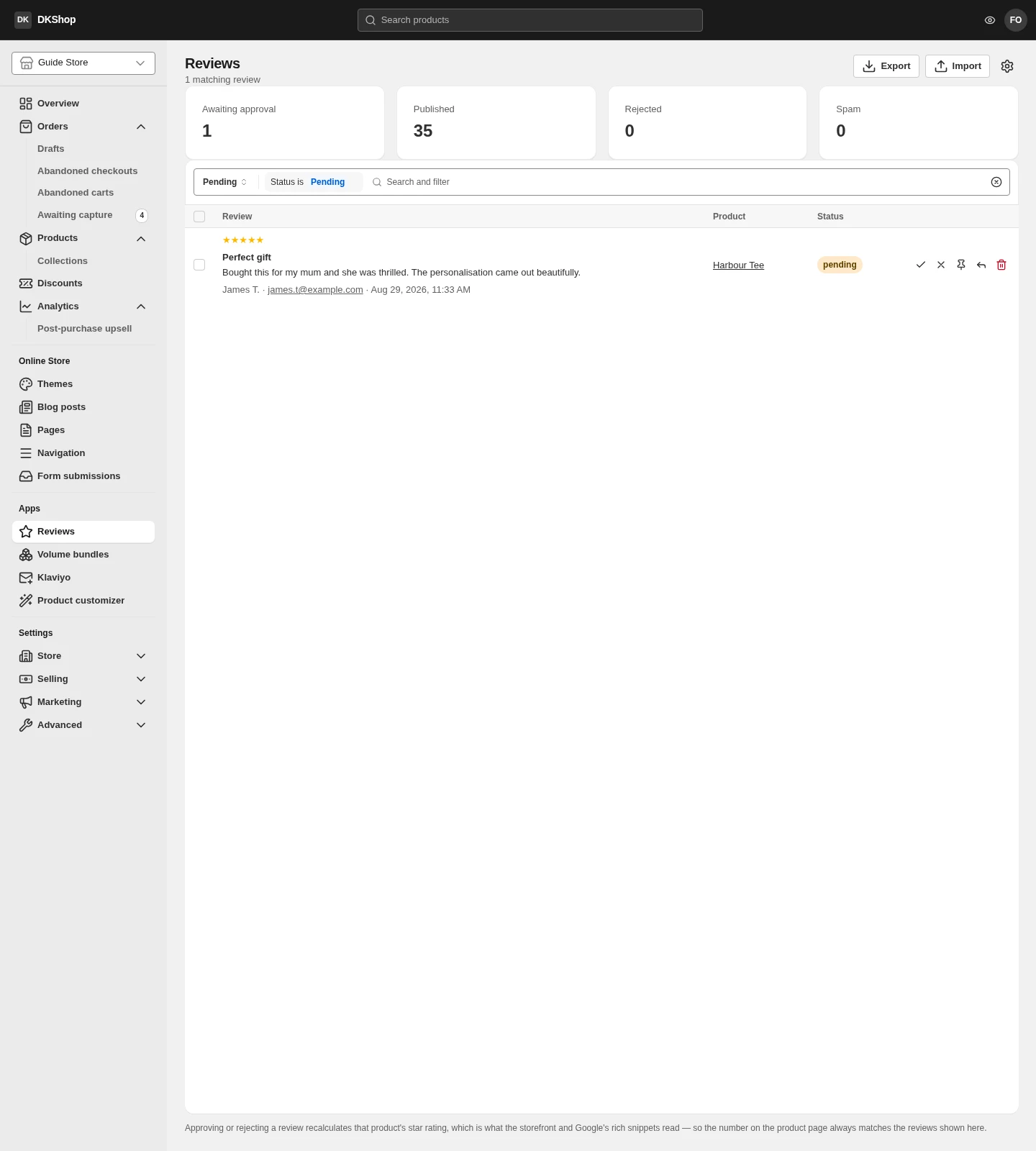
The page opens on the Pending filter, because that is the work rather than the view. The four counters at the top always show real totals: pending · published · rejected · spam. Clear the filter to see everything.
Approve or not
Four states:
| State | Meaning |
|---|---|
| Pending | Just submitted, unread. Not shown on the storefront |
| Published | Live on the product page and counted in the rating |
| Rejected | You said no. Not shown, not counted |
| Spam | The same, but classified separately for filtering |
Each row has four buttons:
- ✓ Approve — publish it.
- ✕ Reject — do not publish.
- 📌 Feature — pin it as a highlight. A theme can show this group separately.
- ↩ Reply — answer publicly under that review, as the store.
Approving or rejecting recalculates the product's rating immediately — the line at the bottom of the page says exactly that. The rating is not something you type onto a product; it is derived from the published reviews. So the number on the product page always agrees with the reviews listed underneath it, and you cannot make the two disagree.
The Verified buyer badge appears when the writer really did buy that product — the most trustworthy signal on the page, and not editable.
Replying to a 3-star review is worth more than deleting it. Readers trust a page with a few average reviews more than a page of nothing but 5 stars, and your reply is the part they read most closely.
Importing from another platform
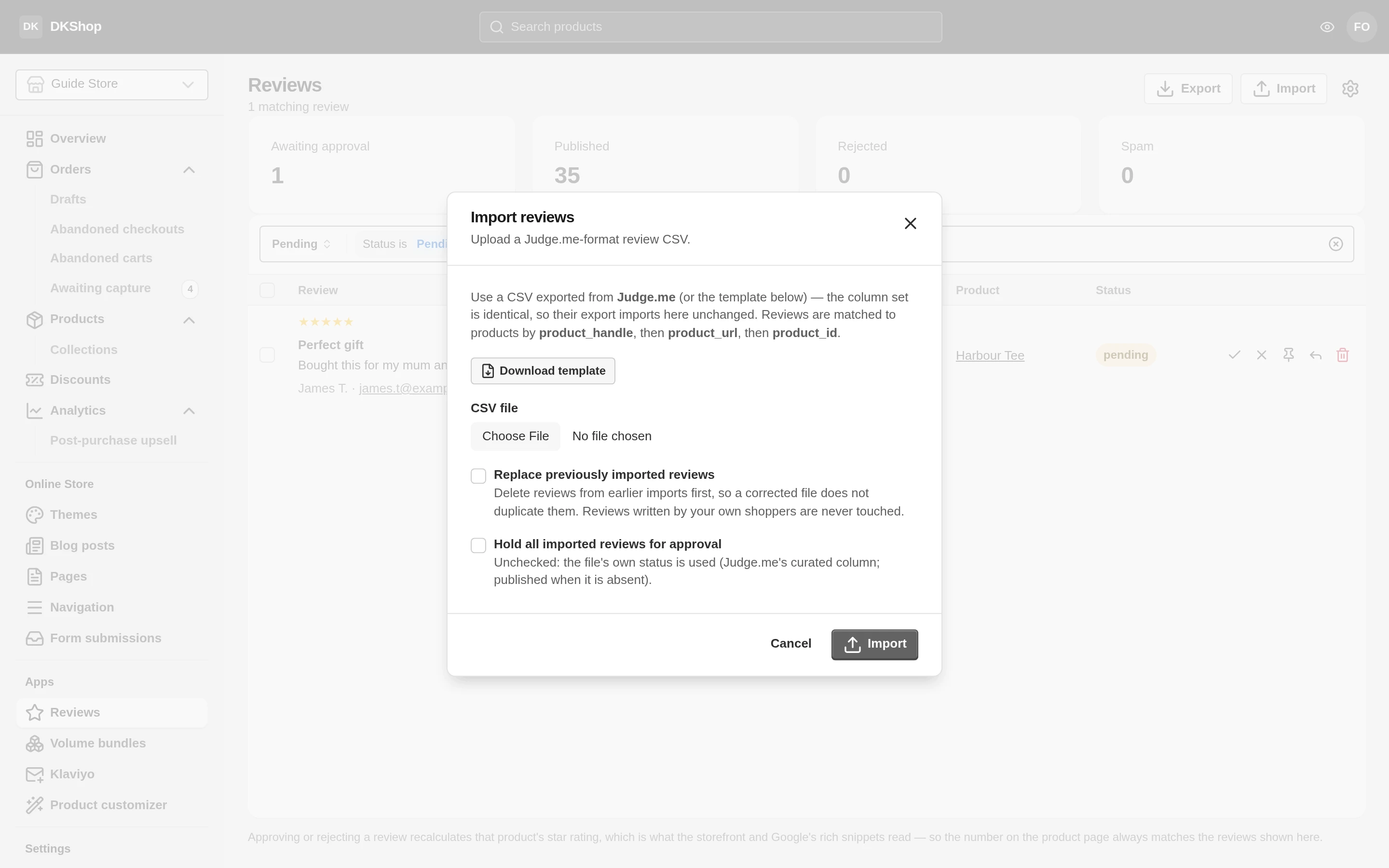
Import takes a CSV in Judge.me's own column set — a file exported from Judge.me imports here without editing. If you do not use Judge.me, press Download template for a sample file.
Reviews are matched to products in this order: product_handle →
product_url → product_id. So if a product's handle differs from the one
in your old store, fix the product_handle column in the file before importing.
Two options at import time:
- Replace previously imported reviews — delete the previous import and import again. For when you imported the wrong file.
- Hold all imported reviews for approval — force everything to Pending.
Unticked, the state in the file is used (Judge.me's
curatedcolumn; without it, they count as published).
On a first import, tick "Hold all for approval" even if you trust the old data. Importing a few hundred reviews straight onto the storefront with nobody having read them is the fastest way to get a review that names your old platform onto your product page.
Export downloads every review in the same format — for a backup, or for moving elsewhere.
Showing reviews on the storefront
Reviews do not appear by themselves. They show in two places, and each is enabled separately in the theme builder:
- The star rating on the product page — the
ratingblock in the product information. - The full review list — the
product-reviewssection, placed wherever on the product page you like.
The same data is also embedded in the page as JSON-LD (Review and
AggregateRating), which is what Google reads to show stars in search results. That
part is automatic and needs no switch.
Reference
| Where | Control | Notes |
|---|---|---|
| Top | 4 counters | Real totals, independent of the filter |
| Top | Import / Export | CSV in Judge.me's format |
| Filters | Status | Pending · Published · Rejected · Spam |
| Filters | Rating | 1–5 stars |
| Filters | Search box | Searches the body and the author name |
| Row | ✓ | Approve — recalculates the rating at once |
| Row | ✕ | Reject |
| Row | 📌 | Pin as featured |
| Row | ↩ | Reply publicly |
| Row | 🗑 | Delete permanently |
| Row | Verified buyer | Automatic, not editable |
| Import | Replace previously imported | Deletes the previous import |
| Import | Hold all for approval | Forces Pending. Tick it on a first import |
| Import | Product matching | product_handle → product_url → product_id |
Next: Volume bundles — selling 2 for less than twice the price of 1.
Verified against 82dff35b1474 · 2026-08-29